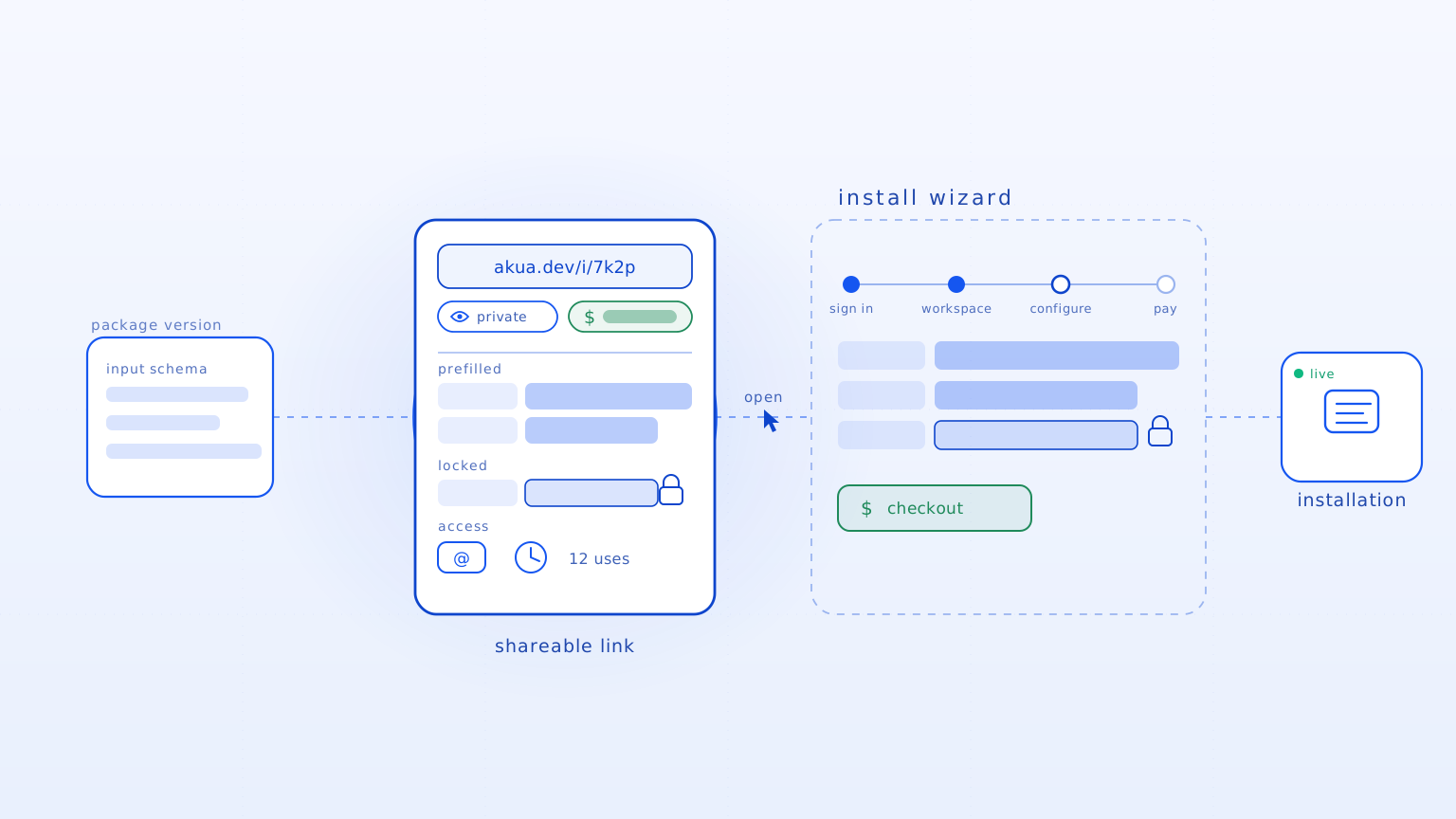
When each deal brings a new environment, delivery work compounds.
The first install is only the beginning. Every customer adds a different environment, access model, update path, and support boundary. Without a repeatable handoff, each new deal becomes another delivery project.
This is most urgent when you have:
- Paying B2B customers. You already have active self-hosted or customer-cloud demand.
- Products with operational weight. Your software has services, state, secrets, migrations, or customer configuration.
- More deployments ahead. You need a repeatable path before each customer becomes another services project.
Move from Product to customer without rebuilding the offer.
Akua gives the software vendor and the customer one clear handoff. Seller state, customer state, and platform authorization stay separate through the order.
- Package release. Choose the version you are ready to deliver.
- Product. Keep one commercial identity for the software you maintain.
- Offer link. Share one path with the Package version and customer defaults already resolved.
- Customer Workspace. Give the customer its own boundary for the order and deployment.
Customer install view
Decide who owns what before you promise the deployment.
Every product and environment has a different operating boundary. Make that boundary clear before it becomes a customer commitment.
- You bring: the Product, Package version, licensing model, customer requirements, and current install process.
- We map together: target environments, installation, access boundaries, updates, rollback, monitoring, backup, incidents, and support.
- The customer controls: its Workspace, order, target infrastructure, and the access it grants.
How the handoff works
Publish a Package release
Choose the version and configuration you are ready to support.
akua package publish your-productCreate the Offer link
Resolve the Package version and customer defaults in one shareable path.
akua.dev/i/customer-offerHand off to the customer
The customer accepts the offer and continues inside its own Workspace.
Order accepted · Install readyClear control at every boundary
- The customer controls its Workspace and target infrastructure.
- The Offer link resolves the Product and Package version before the handoff.
- Access, updates, rollback, and support ownership are agreed for the real deployment.
- You keep one supported Product instead of inventing a custom process for every deal.
FAQ
What does Akua add to Docker or Helm?
Akua adds the governed handoff around your artifact. Your artifact describes what runs. Akua connects it to the Product, Offer link, customer Workspace, and a reviewed installation and lifecycle boundary.
Which environments do you support?
Support depends on the application, Cluster, access model, and lifecycle requirements. Bring one real target environment and we will map what is supported, what needs integration work, and what remains with your team or customer.
Do I need a separate product for self-hosted customers?
The goal is one Product and a repeatable delivery path. During the review, we identify what can stay shared and where your application or customer environment needs specific work.
Where should we start?
Start with the customer deployment that is hardest to repeat. Bring the Package version, target environment, current install steps, and the ownership questions blocking the deal.